Recraft V4 in action
What Recraft V4 renders on Genfire.
What Recraft V4 is best at
V4.1 design-grade output
Sharper prompt control and cleaner composition than V4, with headlines and labels that render as typeset type rather than approximated letterforms.
Custom styles
Recraft V4 Styles trains a style from 1–10 of your reference images and returns a style ID, so every later generation — raster or vector — comes back in the same look.
True vector output
The Vector variants return a real SVG, not a traced raster: logos, icons, and flat illustration that scale cleanly to any size.
Pro and Utility tiers
Pro pushes fidelity for hero marketing and large-format work; V4.1 Utility and Utility Pro run the same models faster at the same price for pipeline-scale volume.
Recraft V4 at a glance
Prompt ideas
Built to Recraft V4’s strengths — steal these to get started.
How to use Recraft V4 on Genfire
- 1
Describe it
Write a prompt, and pick Recraft V4 in the model selector.
- 2
Generate & compare
Render the image, iterate on the prompt, or run the same brief on a sibling model to compare — all from one credit balance.
- 3
Finish & publish
Send the result into Genfire's editor, upscaler, and audio tools, then export platform-ready output.
Generated assets that pass a design review
General image models optimize for the wow shot; design work needs something stricter — assets that sit inside a system. Recraft's focus is exactly that: consistent illustration styles across a set, icons that share a visual language, marketing graphics with deliberate composition, and text that renders as typeset rather than approximated. V4.1 tightens prompt control and composition over V4, and the Vector variants hand back a real SVG, which is the difference between an illustration you can ship to a print house and one you can only post.
Recraft V4 Styles is what turns that into a brand system. Attach 1–10 reference images, train the style once, and Genfire saves it as a reusable style ID — every later generation in that style matches, whether it renders as raster or SVG, Standard or Pro. That makes Recraft the natural pick for the unglamorous majority of commercial image work: landing-page art, blog headers, app illustrations, social templates, and brand collateral. It pairs with the brand kit in Ad Studio — define the palette and tone once, then generate on-brand assets at volume, with the Pro tiers reserved for hero pieces and the Utility runtimes for the long tail.
Recraft V4 — frequently asked questions
What is Recraft V4?
Recraft V4 is a design-focused image generation model producing design-grade illustrations, icons, and marketing visuals with reliable text rendering. Recraft V4.1 is the current generation on Genfire, and the V4 and V4 Pro endpoints stay available alongside it.
What is new in Recraft V4.1?
Recraft V4.1 sharpens prompt control and composition over V4, and it ships a wider bench: Standard and Pro raster tiers, V4.1 Vector and V4.1 Pro Vector for true SVG output, and V4.1 Utility and Utility Pro, which run the same models on a faster runtime at the same price for high-volume ideation and content pipelines.
What are Recraft V4 Styles?
Recraft V4 Styles generates in a custom style of your own. Supply 1 to 10 reference images and Genfire trains the style inline and saves the style ID, or pick a style you trained earlier and reuse it — so a whole campaign shares one look. It comes in four variants: Styles, Styles Pro, Styles Vector, and Styles Pro Vector. Training a style costs credits of its own; reusing a saved style afterwards costs no more than a normal generation.
How is Recraft different from photoreal models?
It optimizes for designed output — style consistency, composition, typesetting — rather than photographic realism, making it suited to brand and product-design work.
What do the Pro tiers add?
Recraft V4.1 Pro and V4 Pro are premium quality tiers tuned for hero marketing and branding visuals and for large-format output where fidelity and polish matter most.
Can Recraft output real vector files?
Yes — the Vector variants on both V4.1 and V4, and the Styles Vector variants, return a true SVG rather than a raster image, which is what logos, icons, and flat illustration need in order to scale cleanly.
Can Recraft keep a consistent style across assets?
Yes — style consistency across a set is its core strength, and Recraft V4 Styles makes it explicit by saving a trained style you can reuse on every asset in a set.
How do I try Recraft V4.1?
It runs in Genfire's browser studio with no separate Recraft subscription — start on the 20 free credits a new account gets for personal use, then buy a pay-as-you-go credit pack from $19 for commercial work. API, MCP, and CLI access are included.
Recraft or Qwen Image 2?
Recraft for design-system assets, vectors, and brand work; Qwen for typographic posters at 2K, now also in the newer Qwen Image 3. They overlap on text rendering — test your specific brief on both.
Compare with other models
From the blog
All posts →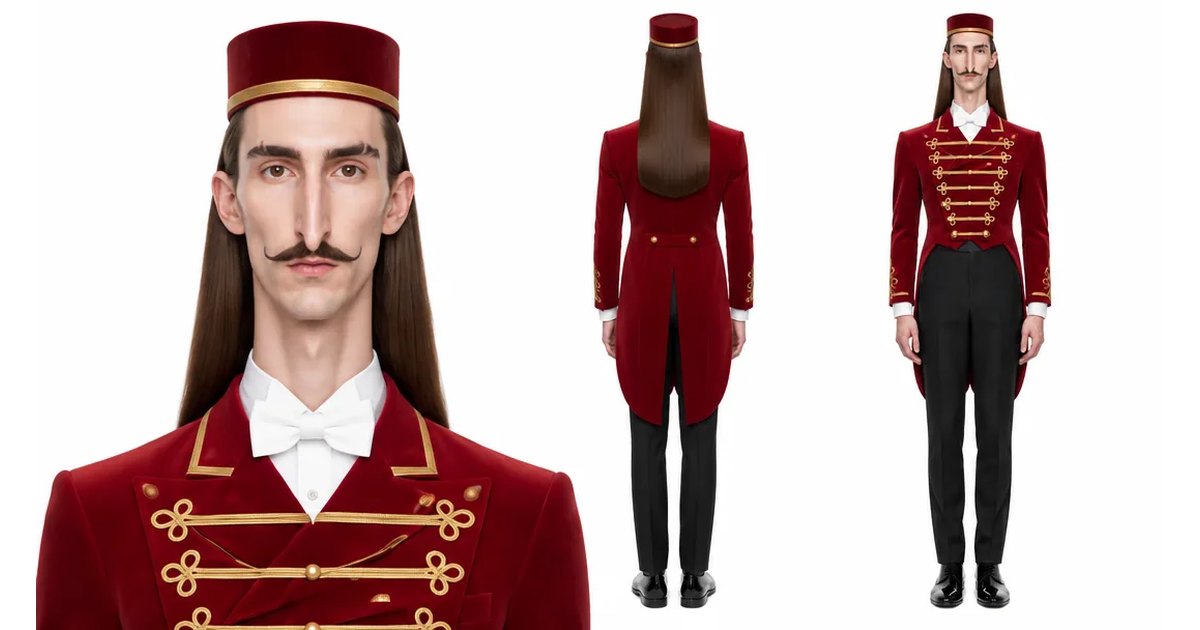
Explore Genfire
AI Tools
AI Models
Generate with Recraft V4 today
Recraft V4 plus 65+ other AI models, one credit balance, and a full editing pipeline — free plan included, no credit card required.
Start Free