What Seedream 5.0 is best at
Flagship photoreal (5.0 Pro)
The top of the Seedream family: materials, lighting and product geometry that hold up at 2K, with up to six images per request so a brief comes back as a set to choose from rather than one guess.
Multi-reference editing
Seedream 5.0 Pro takes up to 10 reference images in one edit. The product, the model, the background and the logo can all inform a single generation instead of being composited together afterwards.
Multilingual text (5.0 Lite)
The Lite tier renders text across languages and is web-search-aware for current real-world subjects. It is marked preview on Genfire — fully runnable, still settling — so keep Pro for anything final.
Splits a flat image into layers
Genfire's Layers editor decomposes an image into a base plate plus transparent elements with z-order, and inpaints the pixels each element was hiding, so every layer is a complete standalone asset. Seedream 5.0 Pro is the only model on the platform that returns that.
Seedream 5.0 at a glance
Prompt ideas
Built to Seedream 5.0’s strengths — steal these to get started.
How to use Seedream 5.0 on Genfire
- 1
Describe it
Write a prompt, and pick Seedream 5.0 in the model selector.
- 2
Generate & compare
Render the image, iterate on the prompt, or run the same brief on a sibling model to compare — all from one credit balance.
- 3
Finish & publish
Send the result into Genfire's editor, upscaler, and audio tools, then export platform-ready output.
What 5.0 changed
Seedream has always been the commerce model — the one whose training skews towards packaging that stays rigid, materials that read correctly and labels that sit flat on curved surfaces. Seedream 4.5 built its reputation on exactly that. What 5.0 Pro adds is headroom on all three axes at once: output up to 2K instead of a lower ceiling, up to six images back from a single request so a brief resolves into a set you can pick from, and an edit path that accepts up to 10 reference images rather than one source frame plus hints. If you searched for "Seedream 5" and landed on a page about 4.5, this is the difference you were looking for — 4.5 is still on Genfire, and the older page is still there, but Pro is the tier the flagship work should run on.
Multi-reference editing is the part that changes how a job is built. The usual way to put a real product on a real model in a real place is three generations and a compositing pass, and every seam is somewhere for the illusion to fall apart. Handing all of it to one edit — product, person, environment, brand mark — lets the model resolve the lighting and the contact shadows once, for the whole frame, which is where composites normally give themselves away. On Genfire the references can come straight from your brand kit — the product photos you have already stored — so the generated scene contains the actual product rather than a plausible impression of one.
Around the model, the rest is platform. Seedream 5.0 Pro is what Genfire's Layers editor calls when you split a flat image into editable pieces — it is the only model here that returns per-layer metadata and inpaints behind each element, so the layers below come back whole. The 5.0 Lite tier covers the multilingual end: label and ad text across languages, plus search-aware generation for subjects that move. Both tiers are exposed on the REST API as image.seedream_v5_pro and image.seedream_v5_lite, through the MCP server at mcp.genfire.ai and from the @genfire/cli, and both share one credit balance with every other model on the platform. Genfire is pay-as-you-go: credit packs start at $19, purchased credits last 12 months, optional monthly plans start at $29, and every purchase includes a commercial license.
Seedream 5.0 — frequently asked questions
What is Seedream 5.0?
Seedream 5.0 is ByteDance's current-generation image model. The flagship tier, Seedream 5.0 Pro, generates photoreal images at up to 2K and edits with multi-reference input, and a lighter tier, Seedream 5.0 Lite, adds multilingual text rendering and web-search-aware generation. Both run on Genfire in the browser, on the API, through MCP and from the CLI.
What is the difference between Seedream 5.0 Pro and Seedream 5.0 Lite?
Pro is the flagship: the sharpest photorealism in the family, multi-reference editing with up to 10 input images, output up to 2K and up to six images per request. Lite is the lighter tier, built around multilingual text rendering and web-search-aware generation, and it returns up to four images per request. Lite is marked preview on Genfire, so Pro is the safer choice for final work.
Should I use Seedream 5.0 or Seedream 4.5?
Use Seedream 5.0 Pro for new work — it is the current generation, it edits from up to 10 references and it renders up to 2K. Seedream 4.5 stays available on Genfire and has its own page, which is worth keeping for reproducing an earlier result or for a look you already dialed in on that model.
How many reference images can Seedream 5.0 edit with?
Seedream 5.0 Pro accepts up to 10 reference images in a single edit, so a product, a person, a background and a brand mark can all steer one generation instead of being composited together after the fact.
What resolution and aspect ratios does Seedream 5.0 support?
Seedream 5.0 Pro generates at up to 2K. Both 5.0 tiers offer three aspect ratios on Genfire — 1:1, 16:9 and 9:16 — with up to six images per request on Pro and up to four on Lite. If you need 4:3 or 3:4, Nano Banana, GPT Image 2.5 and Qwen Image 3 all cover those shapes on the same credit balance.
Can Seedream 5.0 split an image into editable layers?
Yes. Genfire's Layers editor runs Seedream 5.0 Pro to decompose a flat image into a base plate plus transparent elements, each with its own z-order, name and bounding box, and each with the pixels behind it inpainted so it works as a standalone asset. It is the only model on Genfire that does this.
How do I use Seedream 5.0 online, and can I use the images commercially?
Generate in the Genfire browser studio with no ByteDance account, or call image.seedream_v5_pro and image.seedream_v5_lite on the REST API, through the MCP server or from the @genfire/cli. New accounts get 20 free credits for personal use; pay-as-you-go credit packs start at $19, last 12 months, and every purchase includes a commercial license for what you generate.
Compare with other models
From the blog
All posts →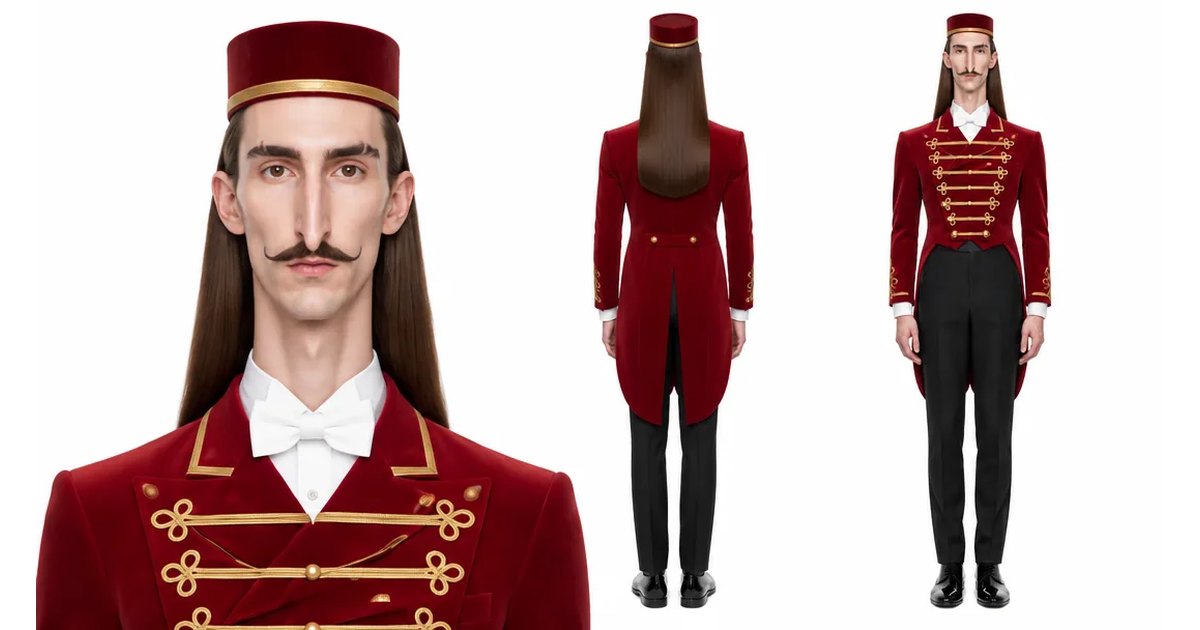
Explore Genfire
AI Tools
AI Models
Generate with Seedream 5.0 today
Seedream 5.0 plus 65+ other AI models, one credit balance, and a full editing pipeline — free plan included, no credit card required.
Start Free